Week 02 · Matrices as transformations
Use the columns of a matrix to understand what it does, then compose rotations and stretches in the right order.
Subject contents · Week 1 · Week 3
Use the columns of a matrix to understand what it does, then compose rotations and stretches in the right order.
A matrix tells you where a move sends every point
An image editor may need to stretch a graphic and then rotate it. The two orders look interchangeable in a list of commands, but a horizontal stretch always uses the horizontal axis of the coordinates it receives. Rotation changes what arrives along that axis.
In this lesson, build a matrix from the two starting arrows, multiply it by a point, and trace two operations in order. The same arithmetic underlies layers that convert input features to new features. Keeping track of input and output dimensions helps you spot a matrix that is turned the wrong way before you inspect its numbers.
The idea
A matrix represents a linear transformation once we choose coordinates. Use column vectors here. If A has columns a₁ and a₂, multiplying A by (x, y) produces x a₁ + y a₂. The columns are the images of the unit vectors (1, 0) and (0, 1). Knowing those two images tells you what happens to every point in the plane.
An m × n matrix maps an n-component input to an m-component output. In NumPy, A @ v means matrix multiplication. A * v uses elementwise multiplication with broadcasting, which answers a different question.
A composition reads from right to left. With B A v, A acts first and B acts second. You can group this as (B A) v or B (A v). Swapping A and B changes which coordinate system each transformation sees.
Build the matrix from the unit arrows
Call the horizontal unit arrow e₁ = (1, 0) and the vertical unit arrow e₂ = (0, 1). Any point v = (x, y) is x e₁ + y e₂. For a linear map, applying A preserves this weighted sum, so A v = x A e₁ + y A e₂. The first column is A e₁ and the second is A e₂.
For the stretch S, the unit arrows go to (2, 0) and (0, 1). For the counterclockwise rotation R, they go to (0, 1) and (−1, 0). Writing those results as columns gives the two matrices.
S = [[2, 0], [0, 1]]
R = [[0, −1], [1, 0]]
Read each bracketed pair as a row in this notation. To calculate the first output of R(x, y), multiply the first row by the input: 0x + (−1)y = −y. The second row gives 1x + 0y = x. A translation, such as moving everything right by three, sends the origin somewhere new. It cannot be expressed by these two-by-two linear matrices alone.
Work it out
Let R rotate 90 degrees counterclockwise and S stretch the x-axis by a factor of two. Their action is R(x, y) = (−y, x) and S(x, y) = (2x, y). Start at v = (1, 1).
- Stretch, then rotate: (1, 1) → (2, 1) → (−1, 2).
- Rotate, then stretch: (1, 1) → (−1, 1) → (−2, 1).
In the first path, the stretched direction gets rotated into the vertical axis. In the second, the stretch happens horizontally after the rotation. The two final shapes have the same area in this example, but their edge directions and coordinates differ.
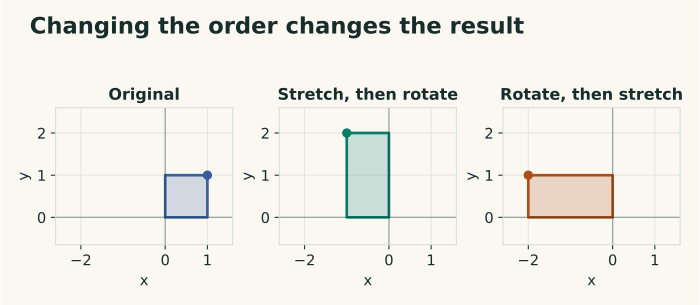
The marked corner starts at (1, 1). Changing the order changes its final position.
Run the Python lab
import numpy as np

rotate = np.array([[0, -1], [1, 0]])
stretch = np.diag([2, 1])
point = np.array([1, 1])

first = rotate @ stretch @ point
second = stretch @ rotate @ point
print("stretch then rotate:", first.tolist())
print("rotate then stretch:", second.tolist())

np.testing.assert_array_equal(first, [-1, 2])
np.testing.assert_array_equal(second, [-2, 1])
assert not np.array_equal(rotate @ stretch, stretch @ rotate)

# Transform a square, with one vertex per row.
square = np.array([[0, 0], [1, 0], [1, 1], [0, 1]])
mapped = square @ (rotate @ stretch).T
np.testing.assert_array_equal(mapped[2], first)
Expected output
stretch then rotate: [-1, 2]
rotate then stretch: [-2, 1]
Check the shape and the order in code
rotate @ (stretch @ point) computes the intermediate point before rotating it. (rotate @ stretch) @ point builds the combined matrix and then applies it. Those two lines agree because grouping a matrix product preserves the order. Switching the matrices changes the order itself.
The lab also maps a collection of corners stored as rows. If T is the combined transformation, applying it to each column would give T @ square.T. Transposing that result back to rows gives square @ T.T, which is the form in the lab. Check the result at the corner (1, 1) against the path you computed by hand. With batch data, checking both shape and one known row catches errors that a shape check alone can miss.
Try it yourself
- Replace the horizontal stretch with a uniform scale of two. Does the order matter now?
- Write a matrix that swaps x and y. Apply it twice to (3, 4).
Check your work. A uniform scale is 2I, which commutes with rotation. Swapping twice returns the original vector. The swap matrix multiplied by itself is I.